The Probara repository: nested suites beside the test cases of the Checkout suite.

Test case management that stays in order as your product grows

Write each test case once, in nested suites your whole team can find their way through. Reuse steps instead of copying them, and see who changed what in every case.

Suites, cases, shared steps, parameterized cases and tags are on every plan, Free included. Custom fields, organization-wide shared steps and parameters, and version history come with Pro; case review with Pro. Compare plans

Every case in a suite tree your team can navigate

Nest suites as deep as the product needs and move a suite, with everything below it, to another parent at any time.

Each case has its own ID and link, and steps with an action, test data and an expected result. Attach screenshots to any step.
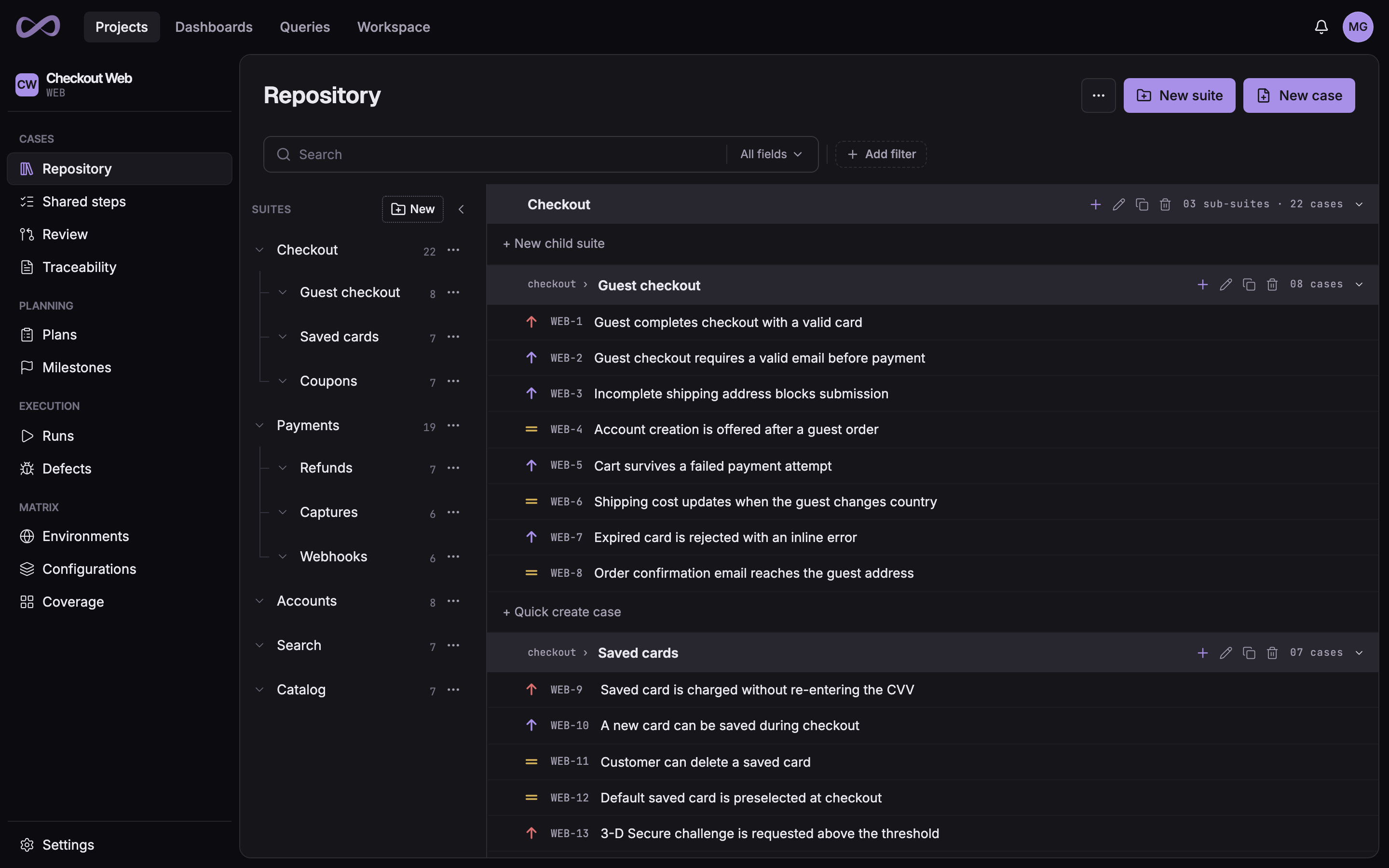
The Probara repository: a tree of nested suites beside the test cases of the Guest checkout suite, each with its ID and priority.

Shared steps: write the login once

Log in, fill a cart, clean up test data: write the steps once as a shared step and insert them into every case that needs them. One edit updates every case that uses it.

Runs that already started keep the steps they had, so editing a shared step never changes a result someone already recorded.

Shared step
Project
Used by the cases of one project, on every plan
Organization
Used by every project, on Pro
Edits
Reach every case that uses it
Runs
Keep the steps they started with

Parameterized cases: one case for every data set

Give a case parameters, such as Browser with Chrome, Firefox and Safari, or a group of accounts with an email and a role on each row. When a run starts, Probara creates one run case for each combination, and you can exclude the combinations that must not run. Write ${Browser} in the title, a step or a condition, and each run case shows its own values.

Each run case keeps its own result, attempts and attachments, and the case reports the worst result among them. Define a parameter once as a shared parameter, and one edit reaches every case that uses it.

Parameter
Single
A name and its values
Group
Rows of values used together
Shared in a project
Used by the cases of one project, on every plan
Shared organization-wide
Used by every project, on Pro
Runs
One run case per combination, each with its own result

Custom fields for the way your team works

Add the fields your process needs to test cases, test runs and defects, for every project or only the ones you choose. Make a field required, give it a default, and filter the repository by it.

Defining fields is part of Pro. Filling them in works on every plan.

Field types
Text
Short text, paragraph, number and URL
Choice
Single select, multi select and radio
Date and checkbox
With a default value
User picker
A member of your organization

Version history with compare and restore

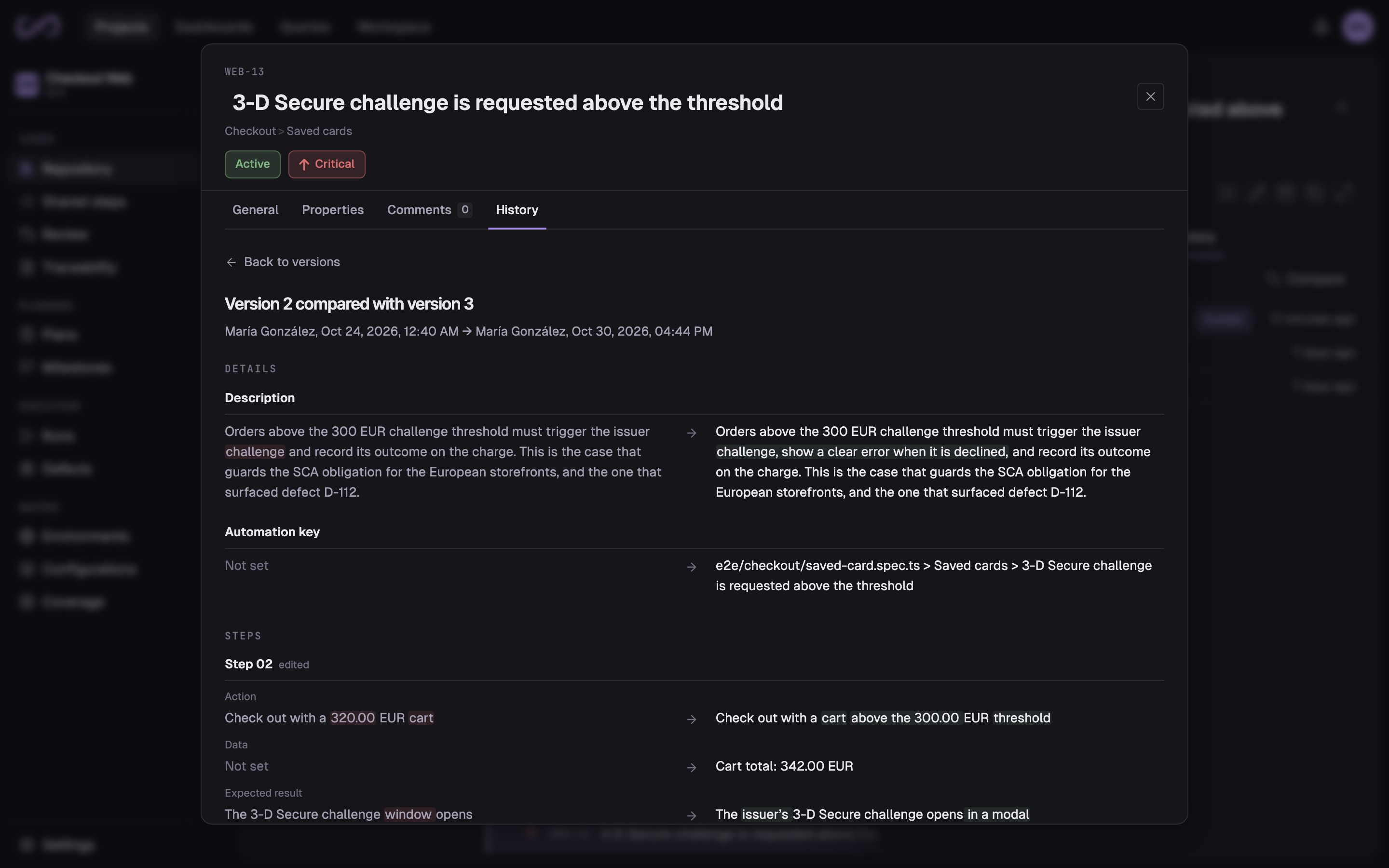
Every save of a case is a new version, with who made it and when. Compare any two versions to see exactly what changed, field by field and step by step.

Restore an earlier version in one click. Restoring saves a new version, so nothing is lost. Viewing, comparing and restoring are part of Pro.

Two versions of a test case compared: the description, the automation key and an edited step, each change highlighted

Review changes before they reach the repository

Turn on review for a project and new cases and edits go to a review request instead of straight into the repository. Reviewers approve, request changes or decline, and the request is merged once it has the approvals it needs.

You can also let runs take in only approved cases. Test case review is part of Pro.

Review settings
Review is mandatory
Every new case and change goes to review
Approvals required
How many before a request can merge
Auto-merge
Merges once the approvals are in
Default reviewers
Assigned to every new request
Approved cases only
Runs take in approved cases only

Find any case in seconds

Search titles, IDs and suite names across the whole project, and filter by priority, status, type or any of your custom fields. The filter lives in the URL, so you can share it.

Tag cases with your own labels, select a whole suite to start a run with its cases or to archive them, and restore archived cases from the trash.

Repository filters
Search
Titles, IDs and suite names
Filters
System fields and your custom fields
Tags
One vocabulary across the organization
Bulk actions
Run or archive a whole selection

Bring your test cases into one repository

Create your organization and import your cases from a spreadsheet. Every new organization starts on a 14-day Pro trial, with no credit card.