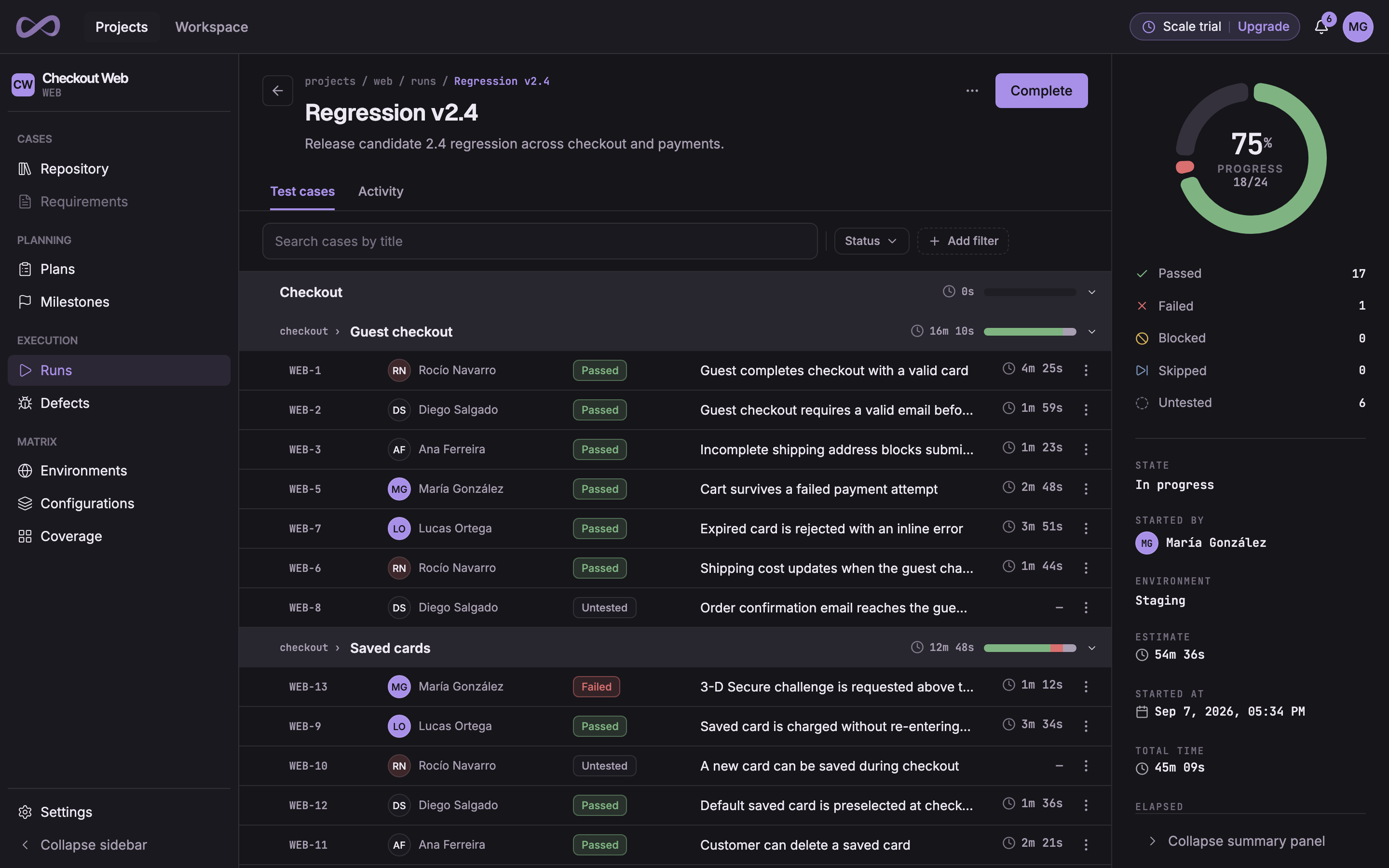
A Probara run the Playwright reporter created from CI, Checkout e2e · main: its repository, branch and commit, each test case with its result, and the run’s totals.

Test automation reporting that lands on your test cases

Every CI run becomes a Probara test run: each test linked to its case, each attempt with its errors, screenshots and traces.

The reporters, the CLI and the GitHub integration come with Pro, and with the 14-day Pro trial every new organization starts with. The REST API is on every plan, Free included. Compare plans

Add a reporter and every CI run becomes a Probara run

Probara has reporters for Playwright, Jest, Cypress, Vitest and Cucumber. Each one runs inside your usual test command: it creates the run, sends the results and closes the run once every result is in. A reporting problem never fails your tests.

Name a case in the test title or with probara.id(), or let the automation key match it. A test that names no case gets one the first time it reports, and every later report finds it again.

Reporters
FrameworkPackage
Playwright 1.42+@probara/playwright-reporter
Jest 29.6+@probara/jest-reporter
Cypress 15.10.0+@probara/cypress-reporter
Vitest 3.2+@probara/vitest-reporter
Cucumber 13.x@probara/cucumber-reporter

Any other framework: send its report with the CLI

The Probara CLI sends the test report your framework already writes, from any CI. Each import creates a run, links every test to its case, creates the cases that do not exist yet, uploads the files the report points to and closes the run.

It signs in with an organization app token read from the environment, which can only report results. It uses no seat and keeps working when the person who created it leaves.

GitHub Actions
- name: Report to Probara
  if: always()
  run: npx @probara/cli import junit reports/junit.xml
  env:
    PROBARA_API_TOKEN: ${{ secrets.PROBARA_API_TOKEN }}
    PROBARA_PROJECT: SHOP

Every attempt, with its screenshots and traces

The reporters record one result per attempt, so a retried test keeps every attempt in its history. Each attempt carries its steps, its error and the files your tests produce.

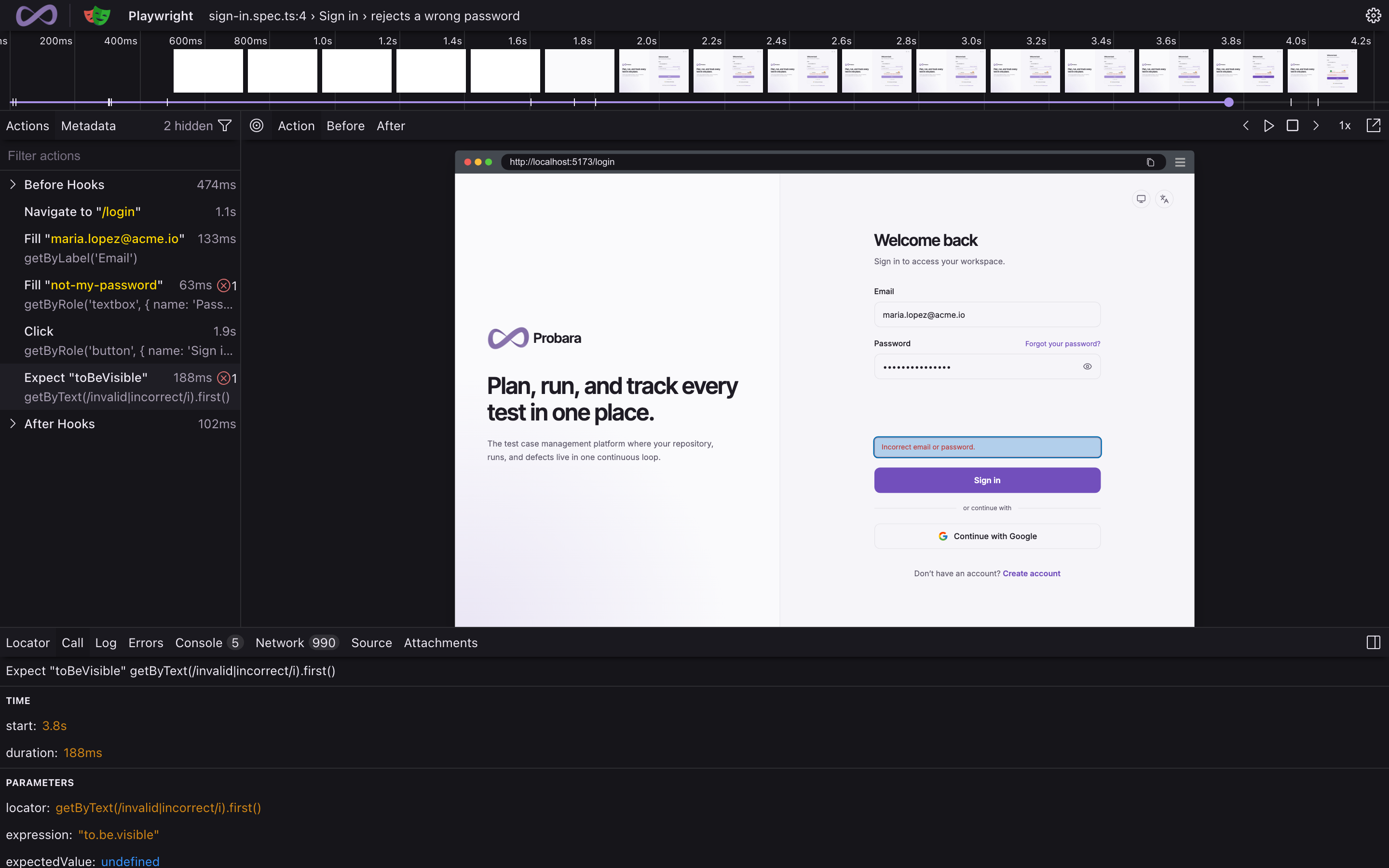
Open a Playwright trace right from its result and replay the test in your browser, with nothing to download.

The Playwright Trace Viewer served by Probara, open on a sign-in test that rejects a wrong password: the timeline, the list of actions and a snapshot of the sign-in page showing “Incorrect email or password.”

One run for a sharded pipeline

With Playwright or Vitest, merge the blob reports of every shard with the reporter and the whole pipeline lands as one Probara run.

Or create the run first with probara run create, report into it from every job and close it at the end with probara run close. Results then appear while the shards run.

Terminal
# Each shard writes its blob report
npx playwright test --shard=1/4

# One job merges them into a Probara run
npx playwright merge-reports --reporter @probara/playwright-reporter ./all-blob-reports

Run only the cases of a Probara run

Create a run in Probara with the cases of a release, a test plan or yesterday’s failures, and have the pipeline run exactly those tests. The other tests are skipped and not reported, and the results go into that run, which stays open.

Run selection works with the Jest, Cypress and Vitest reporters.

GitHub Actions
- name: Run the tests of a Probara run
  run: npx jest
  env:
    PROBARA_API_TOKEN: ${{ secrets.PROBARA_API_TOKEN }}
    PROBARA_RUN_CASES_ONLY: 'true'
    PROBARA_RUN_ULID: ${{ inputs.run_ulid }}

Launch GitHub Actions from Probara, see results on the pull request

Choose a repository, a branch and a workflow, and Probara creates the run and starts the workflow. The run shows the build as it goes, with its status, a link to GitHub and its duration, while the reporters send the results into it.

When a run reported for a pull request is closed, Probara comments its results there: the outcome, the counts, the pass rate and up to 10 failed cases. Each pull request gets one comment, updated with every later run.

.github/workflows/probara-e2e.yml
run-name: ${{ inputs.probara_run_id && format('Probara {0}', inputs.probara_run_id) || github.workflow }}

on:
  workflow_dispatch:
    inputs:
      probara_run_id:
        required: false
        type: string

env:
  PROBARA_API_TOKEN: ${{ secrets.PROBARA_API_TOKEN }}
  PROBARA_PROJECT: ${{ vars.PROBARA_PROJECT }}
  PROBARA_RUN_ULID: ${{ inputs.probara_run_id }}

Send your first automated run to Probara

Create your organization, create an app token and add a reporter or the CLI to your pipeline. Every new organization starts on a 14-day Pro trial, with no credit card.